


SEPTA Park
3.9170.00 Reviews
App Specs
- Version
- 1.4.1
- Updated On
- License
- Free
- Downloads
- 10,000+
- Developer
- Southeastern Pennsylvania Transportation Authority
- Categories
- Auto & Vehicles
- Platform
- Android
Screenshots
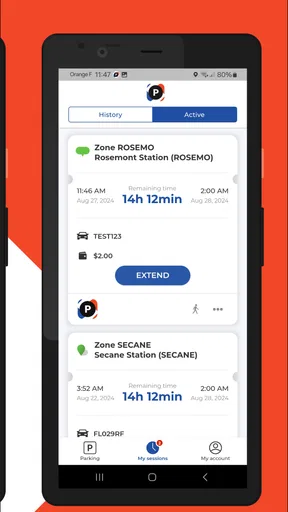
 Analysis by AppCompare
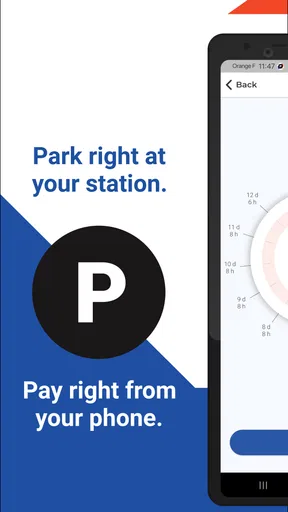
Paying for parking is one of those small travel tasks that can become surprisingly stressful when you are already trying to catch a train. I tested SEPTA Park with that situation in mind: arriving at a SEPTA lot, finding a space, and wanting to handle payment without walking to a machine or searching for cash. The app is a focused Auto & Vehicles tool from the Southeastern Pennsylvania Transportation Authority, and its purpose is refreshingly narrow. It is built for mobile parking payments in SEPTA parking lots rather than trying to become a general travel planner.
That narrow focus is also the main reason to consider it. If you regularly leave your car at a SEPTA station, a dedicated payment app can fit more naturally into your routine than a general parking service. If you rarely use SEPTA lots, however, installing another app may not feel worthwhile. My overall impression is that SEPTA Park is most useful when it becomes part of a repeatable station routine, not when treated as an occasional all-purpose parking solution.
How the everyday parking workflow feels
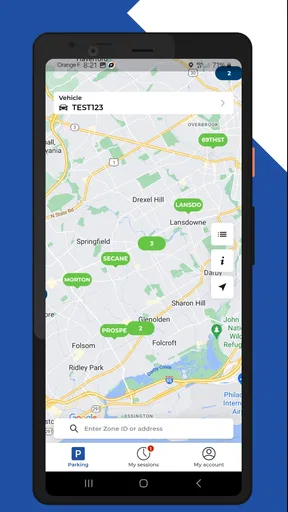
The basic workflow is easy to understand. I arrive at a SEPTA parking lot, check the information posted at the location, open the app, and use the lot details to make the parking payment from my phone. The important habit is to avoid rushing through the identification step. A large transit facility can have nearby lots or similarly named locations, so confirming that the selected lot matches the space I actually used matters more than tapping quickly.
That is where the app’s focused design helps. I am not browsing restaurant reservations, fuel prices, or unrelated travel tools. The experience is centered on parking connected with SEPTA. For a commuter who uses the same station repeatedly, that reduced scope can make the process feel less distracting than switching between a map, a payment service, and a station website.
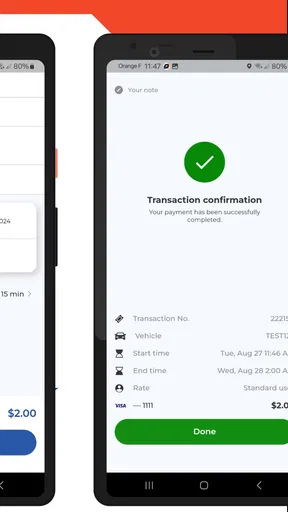
My preferred routine is to do the parking check before walking toward the platform. I look at the lot identifier, enter the required parking details carefully, and wait until the payment flow has clearly finished before putting the phone away. This sounds obvious, but it prevents a common mistake: assuming that opening the payment screen is the same as completing payment. A quick confirmation check is worth the few extra seconds.
The app is free, which removes one barrier to trying it. That does not mean parking itself is free; the app is a payment tool, not a way to avoid the lot’s charge. I would still read the signs at the station and follow the local instructions rather than relying on memory from a previous visit. Parking arrangements can feel familiar while the actual lot selection or payment requirement differs.
A realistic example is a weekday morning at a station I use several times a week. I park, take a photo of the lot information if I need help remembering it, and complete the payment before heading to the train. On the return trip, I do not need to repeat the whole process if the parking session was already handled according to the lot’s rules. That distinction is important: the app can simplify payment, but it does not replace paying attention to the permitted parking period or the instructions displayed at the location.
Worth Reading Before You Choose

EA SPORTS FC Mobile 26 Is a Bigger Football Game, but It Takes Time

Flipboard Shows What News Apps Must Do Beyond the Feed

Switching to Android Auto Means Rethinking Your Driving Routine

Google Calendar Makes a Crowded Week Easier to Manage

Ludo King Makes the Most of the Minutes Between Plans

Baby Panda World Brings Quick Play to Modern Phones, but Its Game Library Feels Busy
For occasional visitors, the first use may take longer because they are learning where the lot information appears and which details the app expects. I would not judge that first attempt against a seasoned commuter’s speed. The real test is whether the second and third uses become more predictable. In my experience, the value comes from reducing repeated friction, not from turning parking into an exciting app experience.
What to check before leaving the car
Before I walk away, I make three checks part of the process. First, I confirm the selected SEPTA lot. Second, I review the vehicle information instead of assuming the previous entry is correct. Third, I verify that the payment action has reached its completed state. These checks are especially useful when I am distracted by a late train, poor weather, or a crowded station entrance.
I also keep the physical signs in view. A mobile payment screen may be convenient, but the lot’s posted instructions remain the practical reference for where to park and what information to use. If the app and the sign seem to point in different directions, I would stop and resolve that mismatch before boarding. The cost of a short delay is usually lower than discovering later that I paid for the wrong location.
One useful habit is to avoid starting the process while driving into the lot. I finish parking first and use the app only when the vehicle is safely stopped. That keeps the app in its proper role: a parking step after arrival, not a distraction during the approach.
Settings and phone habits that make it easier
SEPTA Park does not need a complicated configuration ritual, but my phone habits affect how dependable the experience feels. I keep the app easy to reach, make sure I can unlock the phone quickly, and avoid leaving the payment step until the last possible moment. A low battery, weak connection, or crowded station can turn a simple task into an unpleasant one, so a little preparation pays off.
I would also review the vehicle details each time they appear, particularly if more than one person uses the car or if you sometimes switch vehicles. A remembered entry is convenient only when it is still accurate. This is one of the less obvious trade-offs of mobile parking: speed increases when information is reused, but the chance of overlooking an outdated detail can increase too.
Notifications and phone permissions are worth treating practically rather than automatically accepting everything. If the app offers a permission that clearly supports the payment flow, I consider it in context; if a permission seems unrelated to parking, I prefer to understand why it is needed before allowing it. I would not build my routine around assumptions about background operation or automatic renewal. The safest approach is to read each screen and complete the action deliberately.
Because the app is relatively focused, I do not expect it to replace the phone’s broader tools. I still use my normal maps or transit tools for directions and train planning, then use SEPTA Park for the parking portion. That separation is actually sensible. It prevents the parking payment from being buried inside a larger journey-planning interface, while also making clear that the app is not intended to answer every question about a SEPTA trip.
The age rating is Everyone, and the minimum operating-system requirement is Android 7.1. That makes the app approachable for people using older Android phones, although the real-world experience can still depend on the phone’s current condition, network connection, and ability to run modern payment screens smoothly. I would update the app when an update is available rather than assuming an old installation will always behave the same way.
The current version is 1.4.1, and I see that as a useful reminder to check whether the installed copy is current before relying on it for a time-sensitive commute. Version changes can affect screen labels or the order of steps. I do not recommend memorizing every tap; I recommend memorizing the verification points: correct lot, correct vehicle, completed payment.
Small preparation choices with a big effect
Experienced users often make the app feel faster without using any secret function. I keep the phone accessible before reaching the station, but I do not open the payment flow until parked. I also avoid switching between several apps during the transaction. If I need directions, I finish the navigation task first, then move to SEPTA Park and stay there until payment is complete.
Another useful approach is to create a personal station checklist. Mine would include the lot name, vehicle confirmation, payment completion, and a final glance at the posted restrictions. This is more reliable than trying to remember an unfamiliar lot from a previous visit. It also helps when someone else is driving and asks me to handle the parking payment from the passenger seat.
When the phone connection is unreliable, I would not keep tapping repeatedly in the hope that a delayed screen has failed. I would wait for the current action to resolve, check whether the payment status changed, and avoid creating duplicate attempts. That is a general digital-payment discipline, but it is particularly relevant in a parking lot where uncertainty can lead to unnecessary stress.
Faster patterns for regular SEPTA users
The best shortcut is consistency. Once I know which SEPTA lot I use, I can approach the process in the same order every time. I do not need to explore the app from scratch on each visit. I identify the lot, review the vehicle information, complete payment, and confirm the result. Repetition makes the workflow quicker while preserving the checks that prevent mistakes.
For a commuter, timing matters. I would rather complete payment shortly after parking than wait until the final minute before the train arrives. That gives me room to correct a wrong lot selection or an incomplete screen. It also avoids the temptation to rush through details while watching the platform clock.
For a visitor, the faster pattern is different. I would first read the station’s parking signs carefully, then use the app with those details beside me. A regular commuter can rely on familiarity; a visitor should rely on verification. The app serves both users, but the efficient behavior is not identical.
Families and shared vehicles may need an agreed routine. If one person parks and another handles payment, both should know which vehicle is being covered and which lot was selected. This prevents the awkward situation where the payer assumes the driver used one lot while the driver actually parked elsewhere. SEPTA Park can be part of that handoff, but it cannot resolve an incorrect assumption between two people.
I also find it useful to separate “payment complete” from “trip complete.” After finishing in the app, I return my attention to the train journey. I do not keep reopening screens unnecessarily, but I do make one deliberate confirmation before leaving the car. That balance reduces both careless omissions and repetitive checking.
Compared with paying at a traditional machine, the app can be more convenient because I can handle the payment from the phone and avoid adding a separate stop at the machine. The trade-off is that the phone becomes essential. A machine may feel more reassuring to someone who prefers a physical interface, especially when the phone battery is low or the connection is troublesome.
Compared with a broad third-party parking app, SEPTA Park’s advantage is its direct focus on SEPTA lots. A general parking app may be more useful when I need to compare unrelated garages, search across cities, or manage parking outside the SEPTA system. I would choose the dedicated app for a SEPTA commute and a broader service for a mixed itinerary, rather than expecting one tool to be best at both jobs.
When the quicker option is not the better option
Speed should not come from skipping the lot check. If two locations look similar, selecting the first familiar name is a poor shortcut. The few seconds saved can undermine the whole purpose of mobile payment. I would also avoid relying on a remembered vehicle entry when the car has changed.
Likewise, I would not use the app as a substitute for asking station staff about an unusual parking situation. If signage is confusing or the lot arrangement does not match what I expected, resolving the situation on site is safer than forcing the app to fit an uncertain scenario. A focused payment app is excellent at a normal workflow; it is not a replacement for local judgment.
Limits that matter before you rely on it
The app’s narrow purpose is both its strength and its limitation. It handles the SEPTA parking payment task, but I would not install it expecting a complete transit companion. It is not the tool I would open first for route planning, train schedules, service alerts, or discovering parking options in unrelated systems. I use it alongside other tools, not instead of them.
There is also a learning curve for people who do not park at SEPTA stations often. A commuter can build muscle memory, while an occasional traveler may need to slow down and read every instruction. That is not a serious flaw, but it affects who will feel the benefit immediately. If you use a SEPTA lot only once, the convenience may be modest compared with the effort of setting up and learning another app.
Mobile dependence is another real limitation. The app is useful only when the phone is available and functional at the moment payment is needed. A nearly empty battery, a locked account, or a connection problem can create friction that a physical payment method might avoid. I would keep enough battery for the transaction and avoid treating the app as my only plan when the day is already going badly.
I also think users should be clear about what the app does not solve conceptually. Paying through a phone does not guarantee that the selected lot, vehicle details, or parking period are correct. The app can make the transaction easier, but the user remains responsible for entering and checking the relevant information. That is why my repeatable workflow includes verification rather than just speed.
The rating sits at about 3.9 from roughly six hundred ratings, with around two hundred written reviews. That suggests a mixed but reasonably workable reception rather than universal praise. I read that as consistent with my own view: the app has a clear practical purpose and can remove an annoying step, but its usefulness depends heavily on station habits, phone readiness, and careful lot selection.
It has passed ten thousand installs, so it is not an entirely unknown utility, while still feeling like a specialized tool rather than a mass-market parking platform. The developer, Southeastern Pennsylvania Transportation Authority, gives the app a clear connection to the parking environment it serves. For me, that connection is more meaningful than a long feature list because the app’s value depends on being relevant at the exact place where I leave the car.
Who should use it and who should skip it
I would recommend SEPTA Park to regular SEPTA riders who drive to stations and want a consistent mobile way to handle parking. It is also a sensible choice for people who dislike carrying change or waiting at a payment machine, provided they are comfortable checking information on a phone.
I would be less enthusiastic for someone who never parks in SEPTA lots, someone who strongly prefers cash or physical payment, or someone looking for one app to manage every part of a regional journey. Those users may find a general travel tool or an on-site payment method more appropriate. The app is not failing when it does not cover those needs; it is simply designed around a narrower job.
It can also be a good fit for a household that shares parking responsibilities, but only if everyone agrees on the vehicle and lot details. For a person who frequently changes cars or uses many different parking systems, the need to remain attentive to each location may reduce the convenience advantage.
My verdict after building a repeatable routine
SEPTA Park is a practical, specialized app that earns its place on my phone when I regularly drive to SEPTA stations. I like that it concentrates on the parking payment task instead of pretending to be an entire travel ecosystem. Once the lot and vehicle checks become habits, the workflow is straightforward and less disruptive than stopping at a machine.
My recommendation comes with a clear condition: use it deliberately. Confirm the lot, check the vehicle details, finish the payment, and keep the station’s posted instructions in mind. Those steps are not unnecessary caution; they are what make a mobile parking tool dependable in real life.
The free price and Everyone rating make it easy to try, while support for Android 7.1 means it is not limited to only the newest Android phones. Still, I would judge it by your parking pattern rather than by its install count or rating. If SEPTA lots are part of your normal commute, the app can become a useful daily shortcut. If they are not, a broader parking option or the regular payment method at the lot may be simpler.
After using it as part of a commute-style routine, I see SEPTA Park as a solid convenience app rather than an essential app for everyone. Its best feature is not complexity; it is the way a focused payment step can fit neatly between parking and boarding. Its main weakness is the same focus, combined with the ordinary risks of depending on a phone. For the right SEPTA rider, that is a fair trade and a worthwhile improvement to the start of the journey.
Pros
- Shows nearby SEPTA parking locations for easier trip planning.
- Useful for combining public transit with driving.
- Can help identify parking options before leaving home.
- Supports more convenient station access for commuters.
- Simple concept focused on parking around SEPTA services.
Cons
- Parking availability may change before you arrive.
- Coverage may be limited to SEPTA-related locations.
- Information may not include current prices or restrictions.
- Navigation results can depend on your phone’s location accuracy.
- The app may offer limited value for users who rarely drive to SEPTA stations.
FAQs for SEPTA Park
What is SEPTA Park, and what can I use it for?
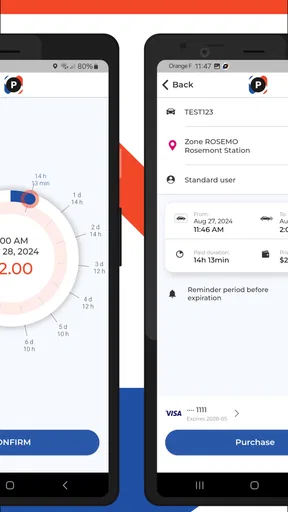
SEPTA Park is a mobile parking app designed to help users pay for parking at participating SEPTA station parking facilities. After installing it, you can typically select the relevant parking location, enter your vehicle and payment details, choose a parking period, and complete payment from your phone. Availability and supported features may vary by station, so always check the signs and information shown in the app.
How do I pay for parking with the SEPTA Park app?
To pay, open SEPTA Park, select the station or parking area where you are parked, and enter the requested vehicle and parking information. The app then guides you through choosing a duration and adding a supported payment method. Before confirming, carefully review the location, license plate, and time period because entering incorrect details may result in an unpaid session or parking violation.
Does SEPTA Park work at every SEPTA station parking lot?
No, the app should not be assumed to work at every SEPTA station or in every parking area. Coverage depends on whether a particular SEPTA-operated or participating facility supports mobile payment through SEPTA Park. When you arrive, check the posted signs for the correct payment instructions and confirm that the selected location in the app matches the lot where your vehicle is parked.
Can I extend my parking session or receive reminders before it expires?
SEPTA Park may allow you to manage an active parking session and, where supported, extend the session remotely before the original time expires. However, extension options can depend on the facility, operating rules, and available parking time. Notifications also depend on your phone permissions and app settings, so do not rely exclusively on reminders; keep track of your expiration time yourself.
What should I do if the app, payment, or parking session does not work correctly?
If SEPTA Park fails to load, rejects a payment, or does not display your parking session, first check your internet connection, app version, payment details, and vehicle license plate information. Take a screenshot or note any confirmation number and keep your payment receipt. If the problem continues, follow the app’s support instructions and contact the appropriate SEPTA parking or customer-service channel promptly.


